
Service area business rank tracking works differently from tracking a shop. Your customers are spread across a whole area, and your address is usually hidden, so a single check from your base tells you almost nothing. The right approach is to track a few real searches from many points across the area you serve, focus on the towns and neighborhoods where your best jobs come from, and judge progress by how far your strong results reach, not by one number.
This guide covers plumbers, electricians, cleaners, roofers, mobile groomers and any business that goes to the customer instead of the other way round.
How Google treats service-area businesses
Google’s guidelines say businesses that serve customers at their locations should hide their address if customers don’t visit it, and set a service area. The service area should be no more than about two hours’ drive from where the business is based.
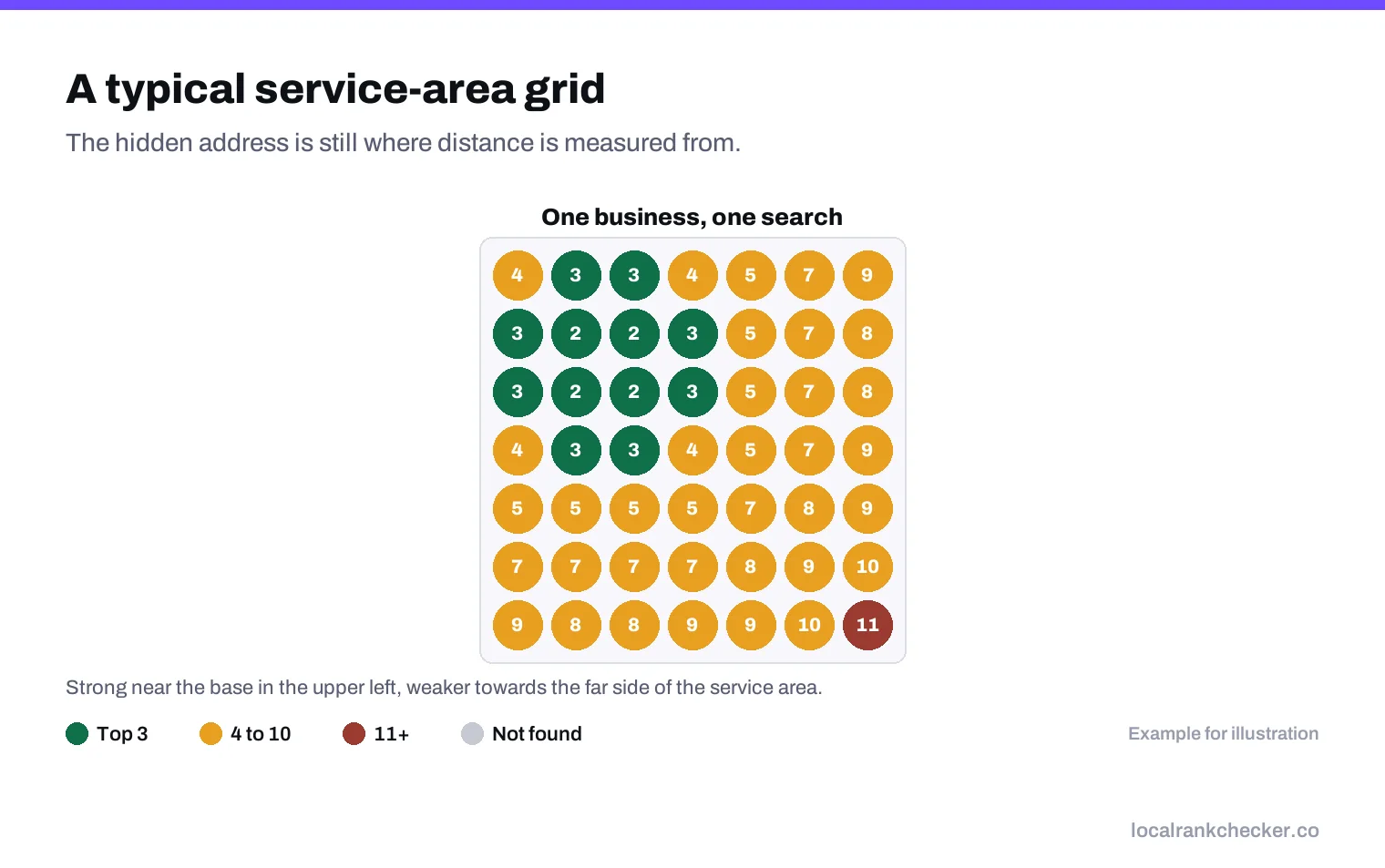
Here’s the part that surprises many owners. Setting a service area tells customers where you work, but it doesn’t make you rank across that whole area. Google still ranks local results on relevance, distance and prominence, as explained on its page on local ranking. Your hidden address is still the point Google measures distance from. So a plumber based in one suburb will usually rank strongly near that suburb and weaker the further out you go, whatever service area they’ve drawn.
Why one check is useless for you
A shop owner can get a rough idea of their ranking by searching from the shop, because that’s where many customers search from. A service-area business can’t. Your customers are searching from their kitchens in twenty different neighborhoods. You might be first in three of them and nowhere in the other seventeen, and a check from your van won’t show that.
That’s why grid tracking matters more for service-area businesses than for anyone else. A geo grid checks your position from many evenly spaced points, so you see where you’re strong, where you fade and where you’re invisible.
Setting up tracking that reflects your business
- Map where your money comes from. Look at last year’s jobs and mark the towns or ZIP codes that brought the most work and the best margins. That’s the area to track.
- Choose 5 to 10 real searches. Use the words customers type, such as “emergency plumber” or “water heater repair”, not internal service names.
- Size the grid to your area. A wide grid for a business that covers a whole county, a tighter one for a business that works in a few neighborhoods.
- Add separate scans for key towns. If one town matters more than others, center a smaller grid on it, so you see detail where it counts.
- Scan on a schedule. Weekly or every two weeks, from the same points, so changes are real changes.
Reading the results
| Pattern | What it usually means |
|---|---|
| Strong near your base, fading outward | Normal. Distance is doing its job. |
| Strong only in a small circle | Weak prominence. More reviews and local links help you reach further. |
| A hole in the middle of a good area | A strong competitor sits there. Look at their profile. |
| Weak everywhere for one search | A relevance gap. Check categories and services for that search. |
| Good in towns you don’t want, weak where you do | Your base is in the wrong place for your goals. Work on prominence and local pages for the towns you want. |
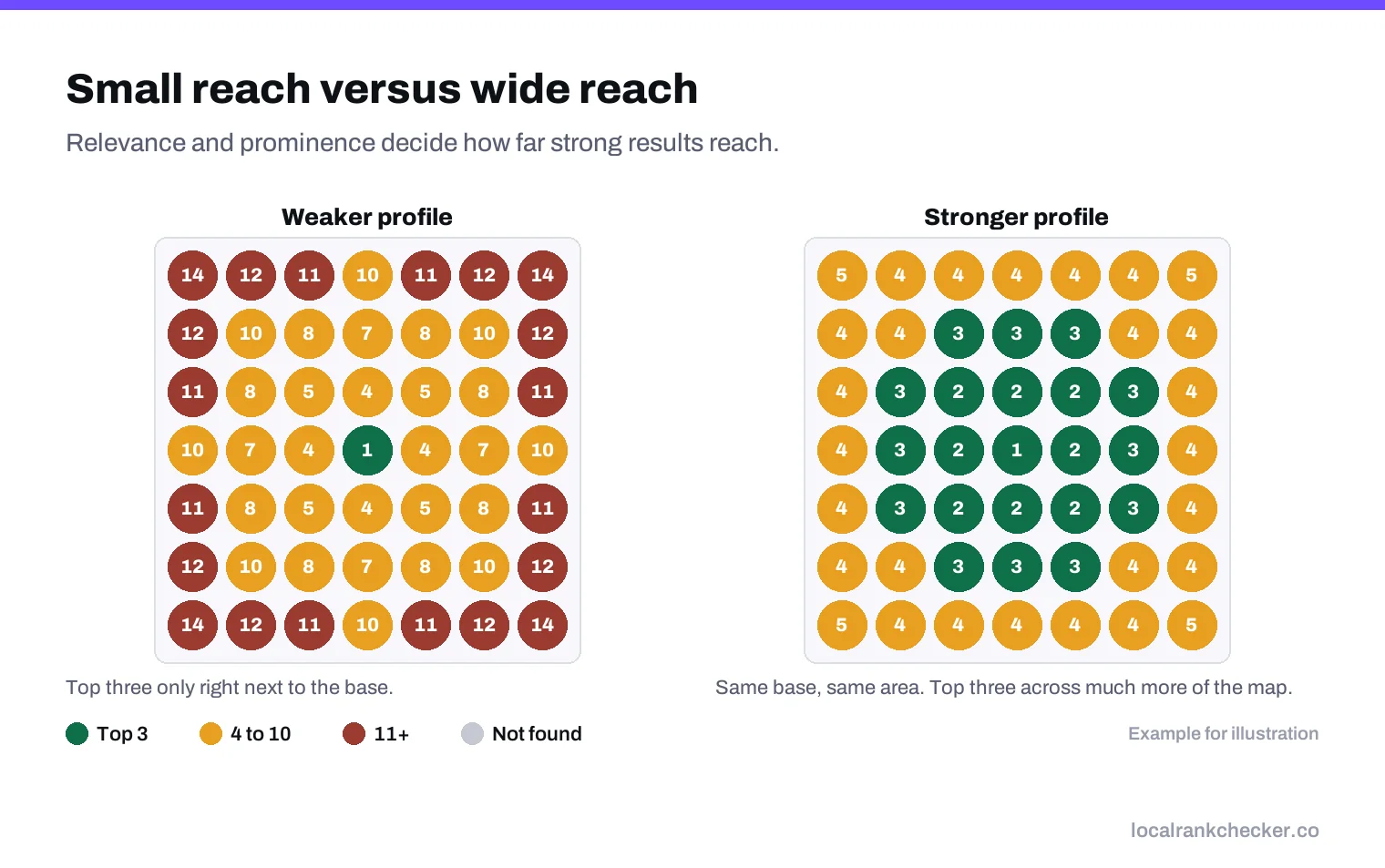
How service-area businesses grow their reach
You can’t change distance, but you can change how much it costs you. A business with strong relevance and prominence keeps ranking further from its base than a weaker competitor.
- Relevance: the right primary category, every service listed, a description that names your work clearly.
- Reviews: a steady stream from customers in the towns you want. Reviews that mention the town and the job help customers there trust you.
- Location pages on your website: a real page for each main town you serve, with jobs you’ve done there, not a copy-and-paste template.
- Local links and mentions: suppliers, local associations and community sites in the towns you want.
- Photos from real jobs: regular uploads show an active business.
An example setup
A plumber based in one suburb gets most of their best jobs from four nearby towns. A sensible setup would be:
- One wide grid covering all four towns, for “plumber”, “emergency plumber” and “water heater repair”.
- A smaller grid centered on the town with the highest-value jobs, for the same three searches.
- One competitor tracked on the same grids: the business that appears in the top three most often.
- A scan every week, and a short review on the first Monday of each month.
That’s six scans a week, enough to see real changes without paying for noise.
Things that don’t work
- Drawing a bigger service area. It changes what customers see, not where you rank.
- Virtual offices in other towns. Google says they aren’t eligible for a profile, and they can get removed.
- Keyword-stuffed names such as “Best Plumber Springfield”. These break the guidelines.
- Moving your hidden address to somewhere you don’t operate from.
A monthly review
- Compare this month’s grid with last month’s for each search.
- Check the towns that bring your best jobs. Are you gaining or losing there?
- Look at the competitors who beat you in those towns and what they’re doing differently.
- Pick one action for next month, such as a page for one town or a review push with customers there.
Our guide on why businesses rank in some areas but not others goes deeper into the distance effect if your map shows a sharp edge.
One last point: be patient with the edges. Gains usually appear near your base first and spread outward over months, so judge progress on the towns closest to you before the far ones.
Where Local Rank Checker fits
The service area rank tracker is built for businesses without a shop front. It scans grids sized to the area you serve, lets you add focused scans for your key towns, and keeps a history so you can see your reach growing month by month. See the pricing, or start a scan and see where your phone should be ringing from.
Frequently asked questions
Does setting a service area make me rank across it?
No. It shows customers where you work, but Google still ranks on relevance, distance and prominence.
Where does Google measure distance from for a service-area business?
From the business location, even when the address is hidden.
How big should my tracking grid be?
Big enough to cover the towns your best jobs come from, with focused grids on the most important ones.
How can a service-area business rank further away?
Strong categories and services, steady reviews, real town pages and local links.
Can I use a virtual office to rank in another town?
No. Google says virtual offices are not eligible for a Business Profile.
Sources
The Google documentation behind the guidance on this page. Google changes these pages without notice, so check the date on any figure before you rely on it.